


 By
ByRecognizing phishing emails is crucial to protecting your data, look for suspicious links, urgent language, and unfamiliar senders to avoid falling victim to cyber scams.
In today’s digital world, email remains one of the most essential tools for communication—and one of the most exploited. Phishing is a type of cyberattack where scammers impersonate trusted entities to trick individuals into revealing sensitive information, clicking malicious links, or downloading harmful attachments. Despite growing awareness, phishing remains one of the most common and successful forms of cybercrime globally.
🎯 What Is Phishing?
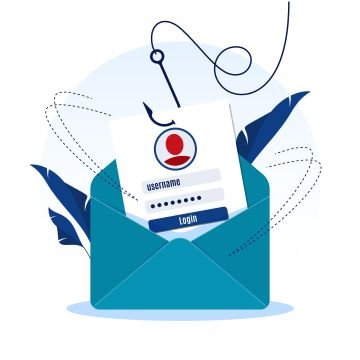
Phishing typically involves fraudulent emails that appear to come from reputable sources—banks, government agencies, tech companies, or even colleagues. The goal is to manipulate the recipient into taking an action that compromises their security, such as:
- Clicking on a fake login link
- Downloading malware
- Sharing passwords or financial details
- Authorizing fraudulent transactions
These attacks often deploy social engineering tactics, exploiting human trust and urgency rather than technical vulnerabilities.
 📬 How to Identify a Phishing Email
Recognizing a phishing email can be challenging, especially as attackers become more sophisticated. However, there are several red flags to watch for:
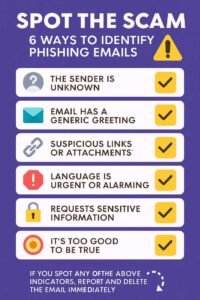
1. Suspicious Sender Address
Phishing emails often come from addresses that look similar to legitimate ones but contain subtle misspellings or extra characters (e.g., support@micros0ft.com instead of support@microsoft.com).
2. Generic Greetings
Legitimate companies usually address you by name. Phishing emails often use vague greetings like “Dear Customer” or “Dear User.”
3. Urgent or Threatening Language
Messages that pressure you to act quickly—“Your account will be suspended!” or “Immediate action required!”—are designed to bypass rational thinking.
4. Unusual Requests
Be wary of emails asking for sensitive information, login credentials, or payment details. Legitimate organizations rarely request such data via email.
5. Suspicious Links or Attachments
Hover over links before clicking. If the URL looks unfamiliar or doesn’t match the supposed sender’s domain, it’s likely a trap. Attachments from unknown sources can contain malware.
6. Spelling and Grammar Errors
Professional organizations typically proofread their communications. Frequent typos or awkward phrasing can signal a scam.
7. Too Good to Be True Offers
Emails promising large sums of money, prizes, or miracle solutions are classic phishing bait.
 📊 How Common Is Phishing?
Phishing is alarmingly common. According to recent cybersecurity reports:
- Over 86% of organizations experienced phishing attempts in the past year.
- In the UK, phishing accounted for 93% of all cybercrime in 2025.
- Thousands of phishing emails are launched daily, targeting individuals and businesses alike.
The reason phishing is so prevalent? It works. Human error remains the weakest link in cybersecurity, and attackers know how to exploit it.
🛡️ What You Can Do
- Use spam filters and antivirus software to block known threats.
- Enable multi-factor authentication (MFA) on your accounts.
- Educate your team about phishing tactics and conduct regular security training.
- Report suspicious emails to your IT department or email provider.
🧠 Final Thoughts
Phishing isn’t rare—it’s rampant. And while technology plays a role in defense, awareness is your first line of protection. By learning to spot the signs and staying vigilant, you can protect your personal data, your business, and your peace of mind.
